Signup se pehla bill: laptop ya phone par.
Free signup kare, menu import karke result review kare, Desktop App ke liye PIN chune, phir laptop par EasyKOT Desktop App install kare ya Android phone ko counter banaye. Device connect karke test bill banaye. Android owner email aur password se sign in karta hai; PIN optional hai. Dashboard ka Get started har step ka action aur result dikhata hai. Dishes ready ka count aapke saved menu ke hisaab se badalta hai.
3 mahine free · bina card details · abhi wala POS band karne ki zaroorat nahi
Shuru karne se pehle kya chahiye?
Supported laptop ya Android phone aur compatible printer pehle se hain toh unhi se shuru kare. Neeche ki list se apne setup ko check kare. Jo optional tool nahi chahiye, use baad mein add kar sakte hain.
| Setup | Kya chahiye | Subscription ke upar kharcha | |
|---|---|---|---|
| Sirf Desktop App | Windows 10/11 ya macOS 13.3+ laptop + compatible ESC/POS printer (58/80 mm), supported cable/network aur paper roll | Printer, agar pehle se nahi hai | |
| Laptop nahi | Android 8+ phone + compatible Bluetooth ya Wi-Fi thermal printer | Printer, agar pehle se nahi hai | |
| Waiters | Unke Android phone, counter wale Wi-Fi pe | ₹0 | |
| Kitchen screen | Desktop App se connected supported tablet ya laptop, same network par | ₹0 | |
| Doosra Desktop App | Ek aur laptop, same Wi-Fi pe | ₹0, har Desktop App ka alag charge nahi | |
| Staff | Har insaan ka apna PIN, 4 se 12 digit (owner ka PIN aap Get started mein khud chunte hain) | ₹0 |
Printer lena hai? Pehle dekhe thermal printer laptop se kaise connect kare. Laptop nahi hai toh poora din ek Android phone par kaise chalta hai, woh dekhe.
Dashboard bilkul yahi poochega.
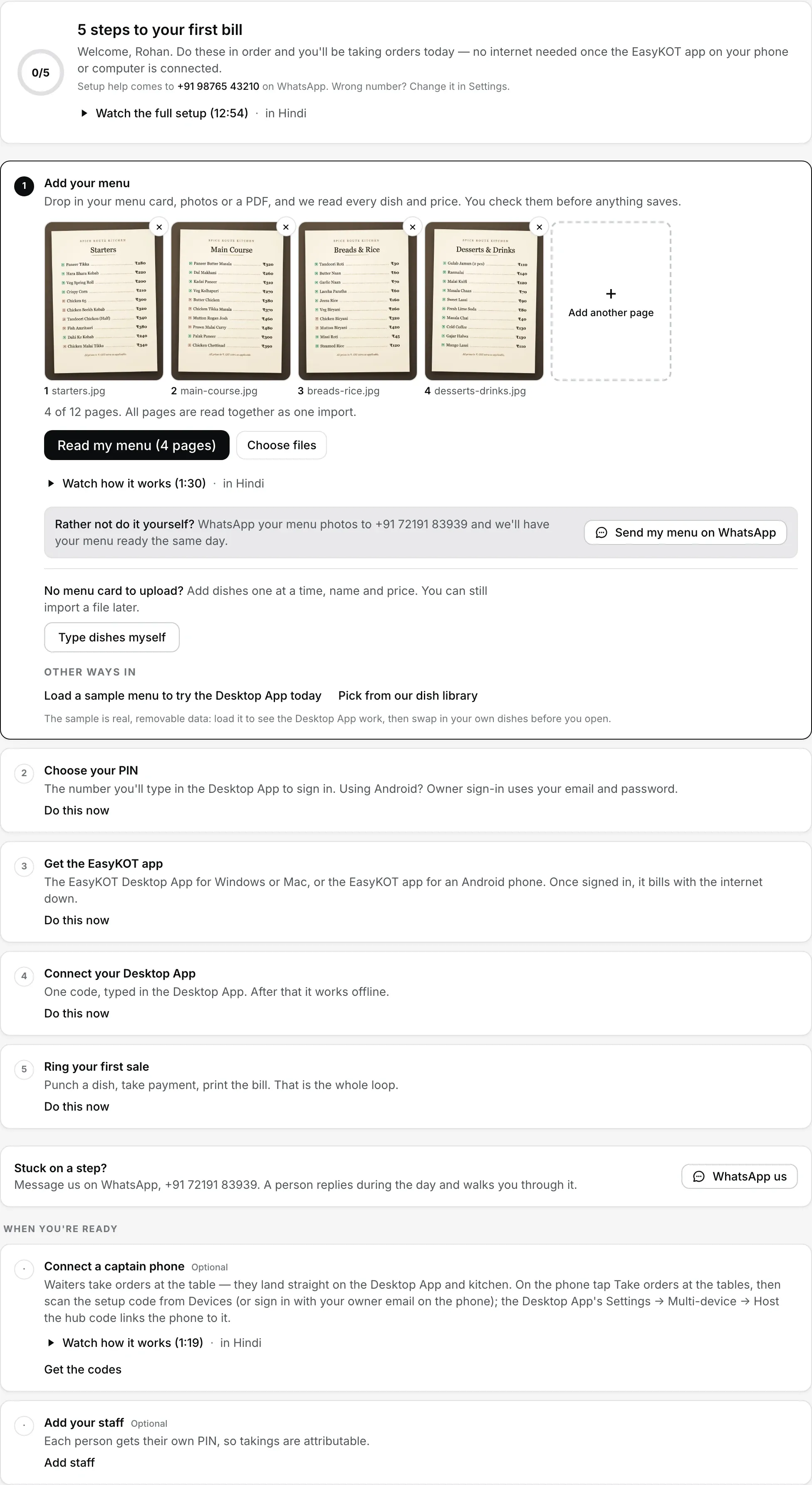
Signup ke baad seedha yahan. Agla step khula milta hai, aur Do this now se koi bhi doosra step pehle khol sakte hain. Tick apne aap lagta hai: dishes save hui, PIN set hua, Desktop App connect hua.
Menu add kare
app.easykot.com par store banaye (3 mahine free, bina card details); dashboard seedha Get started par khulta hai. Pehla step hi import hai: menu ki photos ya PDF (12 pages tak, mix chalega) ya kisi bhi layout ki spreadsheet daale. AI dishes, portions aur prices review grid mein laata hai; aap approve na kare tab tak kuch save nahi hota. Jaldi ho toh Other ways in mein Load a sample menu to try the Desktop App today chune, ya dish library se dishes pick kare. Menu card hi nahi hai? Type dishes myself dabaye: Menu page Quick add item par khulta hai, pehli dish type karne ke liye ready.
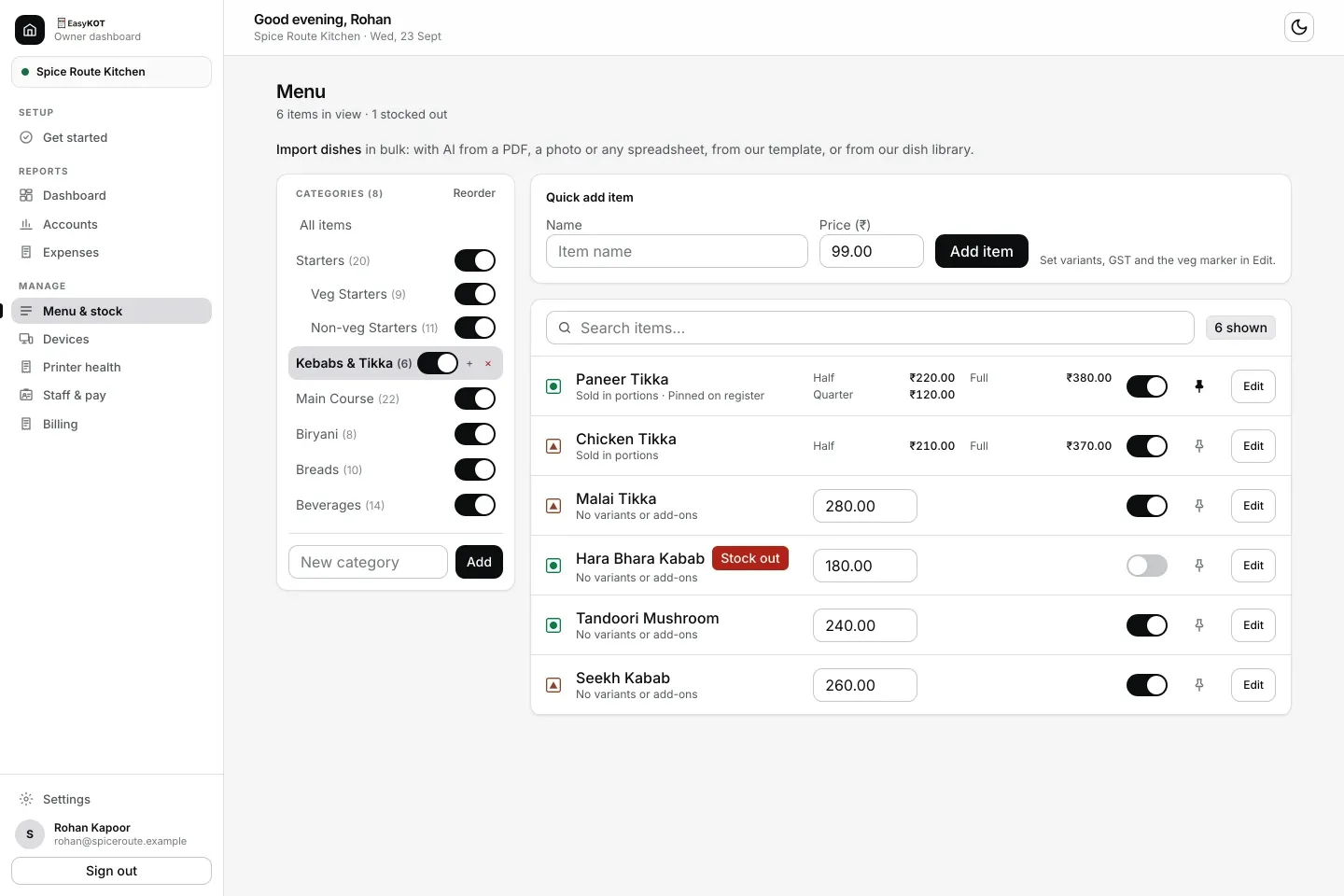
Menu padhne ke baad yahan aata hai: left mein categories, right mein dishes aur price, har dish ka apna stock switch.
Apna PIN chune
Desktop App ke liye 4 se 12 digit ka PIN daale, dobara daale, Save PIN dabaye. Owner sign-in se connect kiya toh Desktop App seedha register par aapke naam se khulta hai. Setup code se connect kiya, ya baad mein register lock kiya, toh PIN pad aata hai aur wahan yahi number jaata hai, isliye aisa PIN rakhe jo yaad rahe. Android par owner email aur password se sign in hota hai, toh phone path par Choose your PIN optional hai. Staff ke apne PIN baad mein Staff & pay se bante hain.
EasyKOT app le
Get started mein Windows .exe, Mac .dmg aur Android ke liye Google Play link milta hai. Windows ya Mac chunte hi pehli baar kholne ki help aa jaati hai: Windows par More info, phir Run anyway; Mac par EasyKOT ko Applications mein drag kare aur wahan dikhi Terminal ki ek line paste kare. Laptop nahi hai toh Android phone counter ban sakta hai aur Bluetooth ya Wi-Fi thermal printer par print karta hai. Android app pehle se hai toh Already have the Android app? Use this phone dabaye. Laptop par Desktop App already installed? Skip this step chune.
Phone ya Desktop App connect kare
Get started mein Desktop App ka naam daale aur Create setup code dabaye (yahi code Dashboard → Devices → Create & get setup code se bhi milta hai). Desktop App par 'I have a setup code' mein code paste kare, ya Owner sign-in use kare; connect hote hi yeh step apne aap tick ho jaata hai. Android phone ho toh Connect your phone khole. Desktop App wala card dikh raha ho toh I’m using the Android app chune. App mein Run the counter dabaye, owner email aur password se sign in kare, phir printer connect kare ya setup skip karke billing shuru kare. Laptop ya setup code nahi chahiye. Desktop App setup code se connect kiya toh step 2 wala PIN maangta hai. Owner sign-in se connect kiya toh register seedha aapke naam se khulta hai. Setup code device ko store se jodta hai, PIN shift sign-in ke liye hai; dono alag hain.
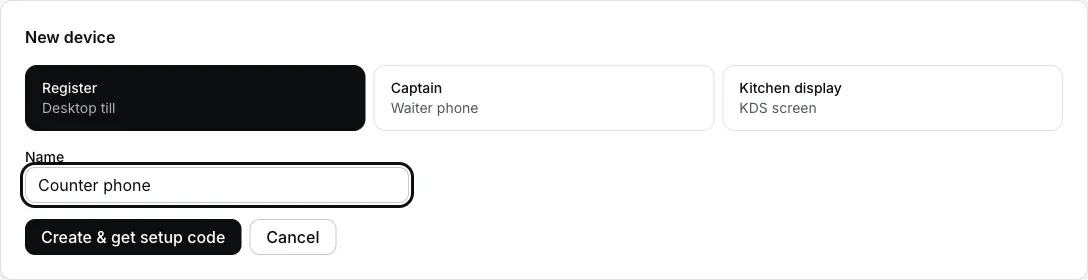
Dashboard → Devices → Add device. Desktop App wale laptop ke liye Desktop App or counter phone, waiter ke phone ke liye Captain, kitchen ke liye Kitchen display. Public app ka waiter-carried own-table printer mode abhi released nahi hai. Manager kisi joined phone ko Device → Printers se whole-store printer fallback bana sakta hai.
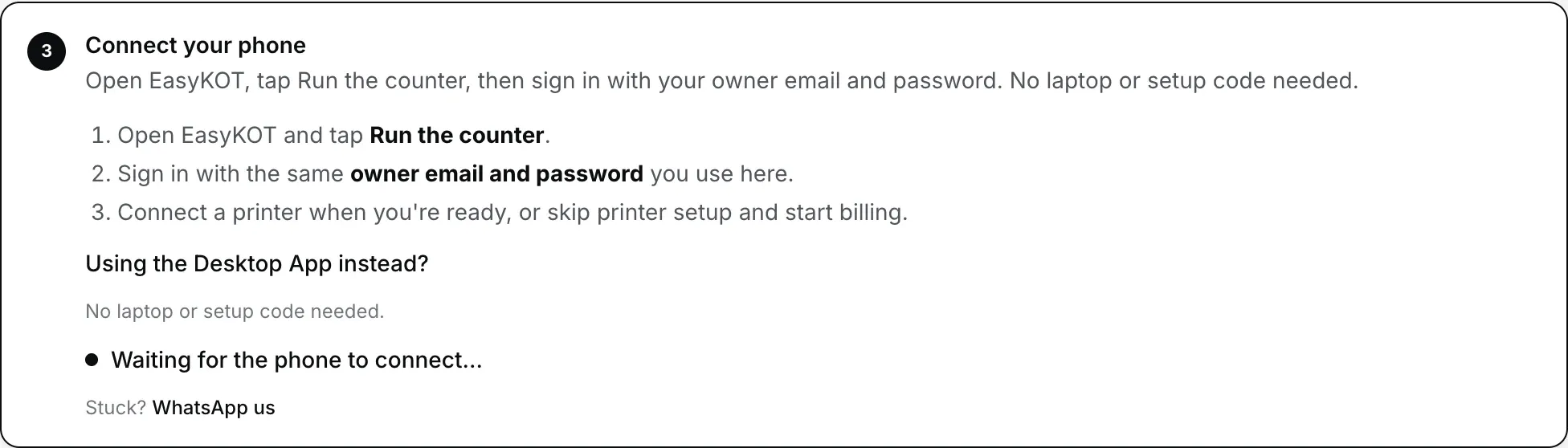
Android app download kiya ya pehle se installed app chuna? Connect your phone mein phone sign in karta hai, code paste karne ki zaroorat nahi.
Test order se pehla bill banaye
Android par + Takeaway chune, dish add kare, Review order aur Send KOT dabaye. Phir Settle mein Cash ya UPI se test payment record kare. Desktop App par dish add karke KOT aur test payment record kare. UPI ko merchant ya bank app mein verify kiye bina UPI mark na kare. Printing optional hai; printer connect ho toh test slip aur test bill ka layout check kare.
Jahan log sabse zyada atakte hain, un steps ki poori guide: restaurant setup guide, printer connection guide, aur printer chup ho jaaye toh printer print nahi kar raha. Desktop App yahan se: download page. Browser use karna ho toh browser register setup aur limits padhe.
Phir, jab aap ready hon.
- Captain phone connect kare. Devices ke setup code ya owner sign-in se restaurant se jode. Desktop App ho toh uske code se optional local pairing kare. Bina desktop pairing ke delivery ke liye internet sync chahiye; phone-only counter desktop LAN pairing nahi deta. Test order bhejkar counter aur kitchen/print delivery status check kare. Captain app ke baare mein · phone setup step by step.
- Staff add kare. Har insaan ka apna PIN, toh day-end pe pata rehta hai kisne kya bill kiya. Desktop App par aapka PIN Get started mein chuna hua hai; Android owner ke liye yeh optional hai. Staff PIN aur roles.
- Kitchen screen setup kare. Supported tablet ya laptop ko Desktop App ke configured local network par jode. kitchen display par tickets aur timer dikhenge. Ready ticket ke liye Bump use kare; Android Kitchen par action Done hai. KDS setup.
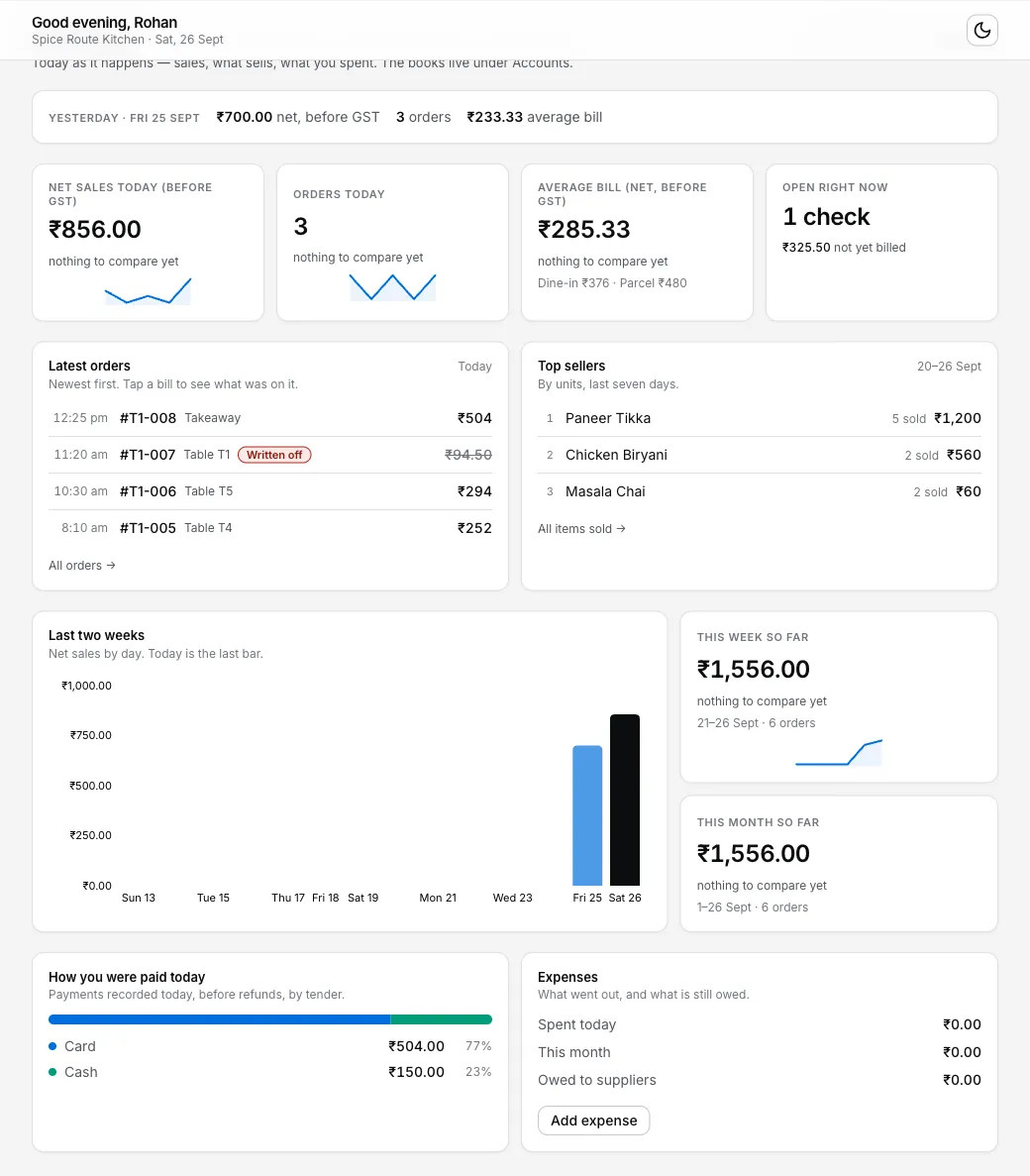
Internet kab chahiye, kab nahi?
Ek baar chahiye: signup, Desktop App ka download, connect code, aur AI menu import (woh dashboard pe hota hai).
Internet outage mein locally: pehle se configured Desktop App par order aur payment record kare. KOT/bill printing ko working printer, configured connection aur power chahiye. Locally saved ko delivered na maane.
Jab ho tab: sales dashboard tak jaati hain aur menu ke changes Desktop App tak aate hain. Bas 30 din mein ek baar Desktop App internet se jude, 20ve din se screen pe yaad dilata hai. Offline simulator mein internet band hone ka sample dekhe, ya padhe internet jaaye toh billing kaise chalti hai.
Abhi koi aur POS chala rahe hain?
Current POS turant band karna zaroori nahi. 3-month trial mein menu aur printer ko alag test orders se check kare. Ek real customer sale dono systems mein record na kare. Setup sahi lage toh service ke bahar switch ka din chune.
- Menu: current POS se Excel ya CSV export mile toh import karke result review kare. Printed menu ki photo ya PDF bhi use kar sakte hain.
- Pehle ek Desktop App: EasyKOT par alag practice orders kare. Live service ka system aur switch ka waqt staff ko saaf bataye.
- Printer: existing ESC/POS printer ko device aur connection ke saath test kare. Test slip ke baad test bill ka layout bhi check kare.
Daam: 3 mahine free, phir ₹299 + GST har mahina, har Desktop App ka alag charge nahi. Poora hisaab pricing page pe.
Seedhe jawaab.
Setup mein kitna time lagta hai?
Shuru karne ke liye card details chahiye?
Setup ke liye internet kab chahiye?
Abhi koi aur POS chala raha hoon. Saath mein EasyKOT try kar sakta hoon?
Waiter aur staff kab add kare?
Atak gaye toh madad kaun karega?
3 mahine try kare, phir plan chune.
Restaurant ka kaam hum samajhte hain, kyunki shuruaat bhi wahin se hui. 3 mahine free try kare, bina card details. Hamari kahani padhe.