Waiter phone se order aur KOT kaise bheje.
Table chune, dishes add kare aur Send KOT dabaye. 'KOT saved' ka matlab round phone par save hua; neeche kitchen status delivery batata hai. Restaurant Wi-Fi par order EasyKOT Desktop App tak seedha jaata hai. Connection na ho toh phone hold karke retry karta hai, aur waiter ko batata hai ki kitchen ko order abhi nahi mila.
Waiter ka apna phone · Android 8+ · paper pad nahi · counter par order dobara type nahi
Ek round table se kitchen tak.
Table chune
Running mein store ke sabhi khule tabs oldest-first dikhte hain, har row par elapsed time aur amount ke saath. Free mein sirf khaali tables aur parcel ke liye + Takeaway hai. Occupied table Free mein nahi aata; doosre waiter ke table mein item add karna ho toh usi existing tab ko Running se khole.
- Upar summary row mein Running · To send · Over 45m dikhte hain. Teesra number batata hai ki kis table ko pehle dekhna hai.
- Seating timer 45 minute par warning aur 75 minute par late dikhata hai. Colour ke saath card ka outline bhi badalta hai, isliye low light ya colour vision difference mein state samajh aati hai.
- Jis check ki saari dishes hat gayi hain uska card Empty dikhata hai aur Over 45m mein nahi ginta. Us par koi wait nahi kar raha. Card khole aur Cancel order dabaye.
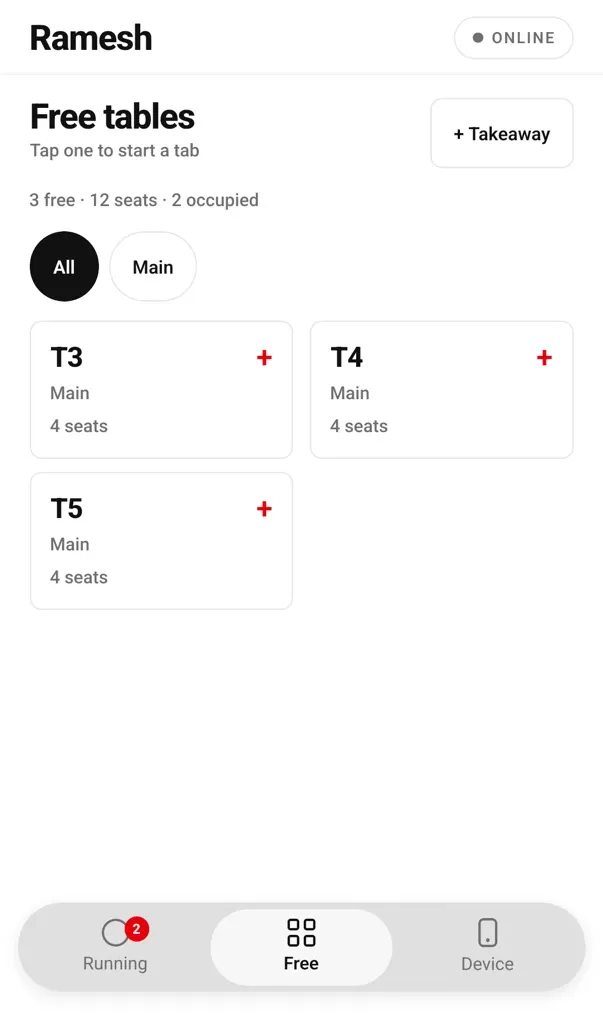
Sirf khaali tables: naya tab shuru karne ke liye table chune.
Items add kare
Menu ke upar selected table aur Choose items → Review order → Send KOT steps dikhte hain. Pehli saved dish confirm karti hai ki kis table ka order shuru hua. Naam se search kare ya category chip chune. Veg green circle aur non-veg brown triangle se dikhta hai. Half/Full portion aur add-on ke min/max rules check kare. Same unfired dish dobara tap karne par usi line ki quantity badhti hai; fired dish badhane par next KOT ke liye nayi line banti hai.
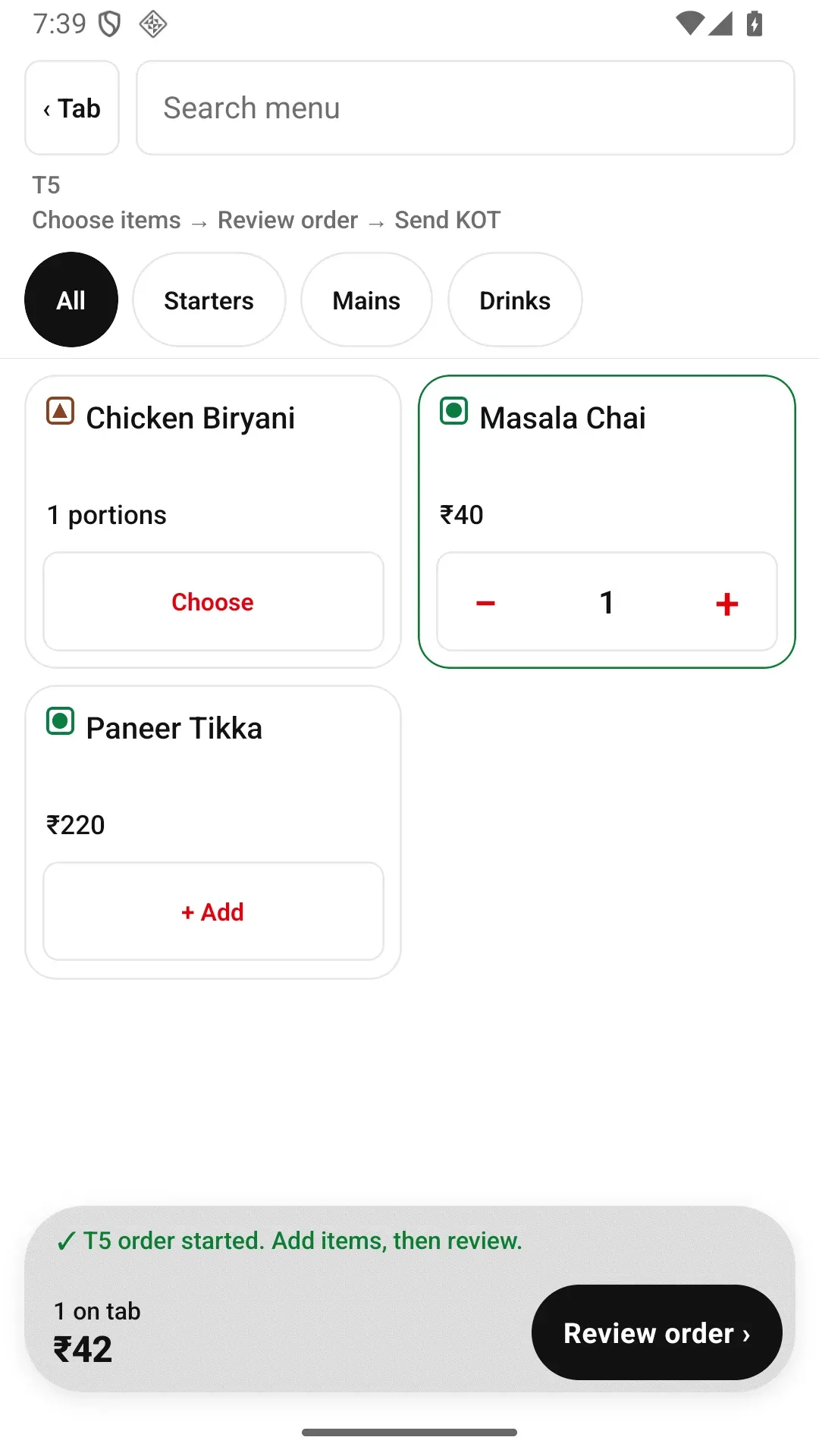
Pehli dish confirm karti hai ki kis table ka order shuru hua aur Review order ka next step dikhati hai.
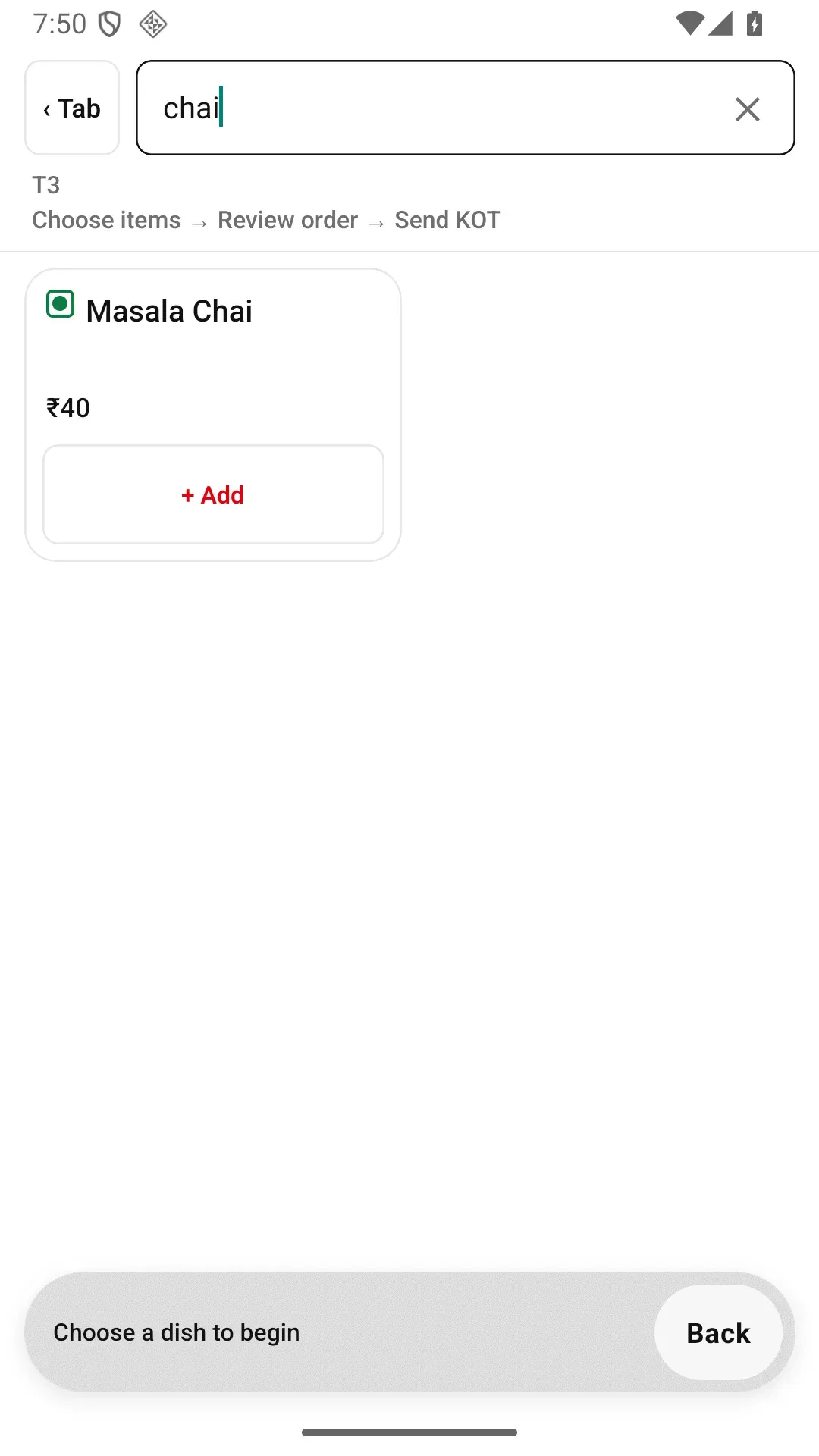
Category chips se jaldi ho toh dish ka naam type karke search kare.
Cooking note likhe
Abhi kitchen ko na bheji gayi line par 'no onions', 'less spicy' ya 'make it mild' jaisa note add kare. Note usi item ke saath KOT par bold print hota hai, isliye instruction table se seedha cook tak pahuchti hai.
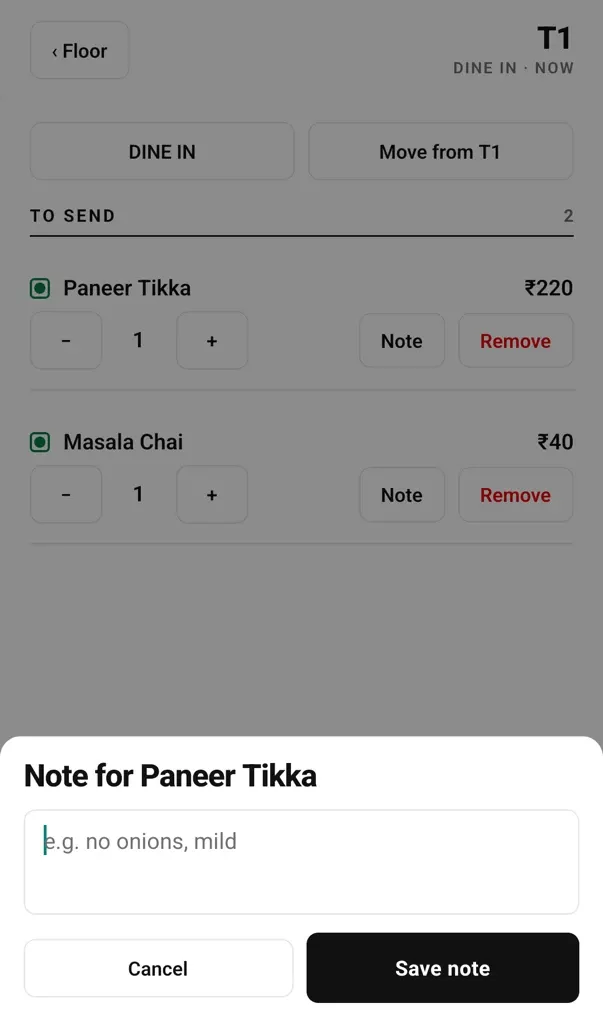
Abhi tak na bheji line ka note sheet: yeh KOT par bold print hota hai.
Send KOT dabaye aur kitchen status dekhe
Order screen To send aur Sent to kitchen alag dikhata hai. Send KOT 3 mein count sirf abhi bheje jaane wale items ka hai. 'KOT saved' ka matlab round phone par save hua; neeche kitchen status delivery batata hai. Restaurant Wi-Fi par round Desktop App tak seedha jaakar printer ya KDS par aata hai. Mobile data se server ke through kuch seconds lag sakte hain. Dono connection na ho toh round phone par hold hota hai, waiting message dikhata hai aur counter ki confirmation tak retry karta hai.
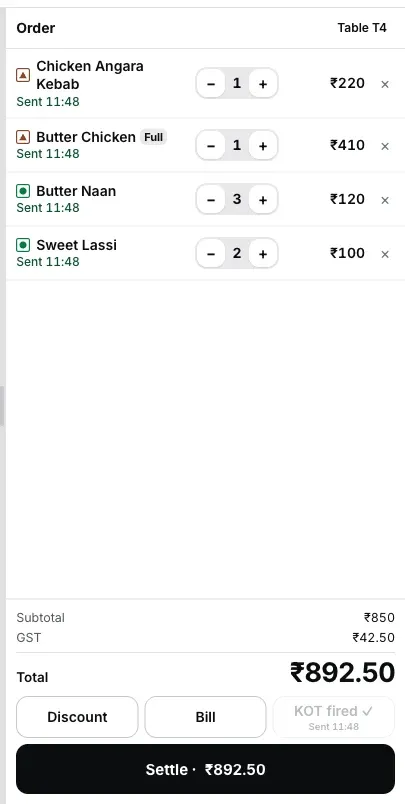
Desktop App par fired round ka view: wahi items bill mein jud chuke hain.
Fired round Desktop App par aata hua dekhna hai? Laptop par live demo kholkar ek round banaye. Yeh browser mein real Desktop App hai, isliye laptop-size screen chahiye. Abhi phone par hain? Android phone par EasyKOT ka flow dekhe.
Running tables, sabse purana pehle.
- Apne khule tabs aur unka timer. Running pehle waiter ke apne khule tabs dikhata hai. Only my orders tick hota hai aur chhupe hue doosre tabs ginta hai; Show all se sab wapas dikhte hain. Har row par elapsed time aur running amount hota hai.
- To send aapki pending list hai. Table mein To send items dikh rahe hain toh items type hue hain par KOT abhi nahi bheja gaya. Table se jaane se pehle is count ko clear kare.
- Free tab mein sirf khaali table hai. Occupied tables yahan nahi dikhte, isliye do waiters ek hi table par galti se alag tabs nahi kholte.
- + Takeaway parcel ke liye hai: wahi menu aur Send KOT flow, table ke bina.
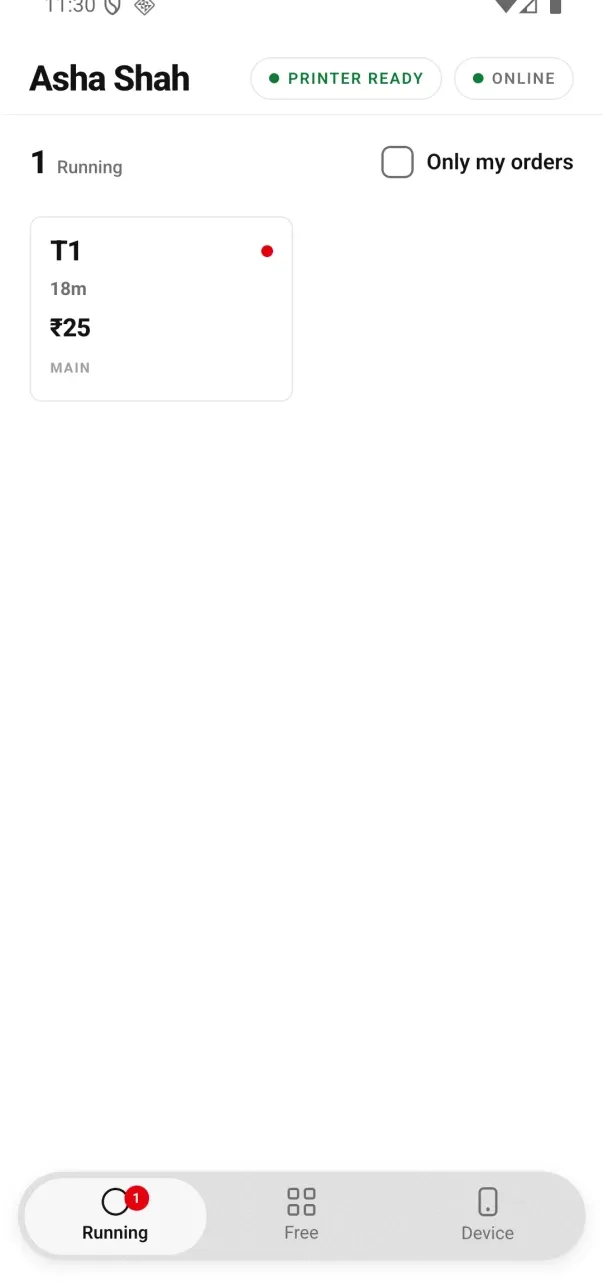
Signed 0.2.12 testing build: the order filter now sits beside the Running count.
Dobara Send KOT kare — sirf naye items print honge.
Guest 9:10 par do aur rotis order karta hai. Rotis add karke Send KOT dobara dabaye. Kitchen ke ticket par sirf wahi do rotis aati hain aur heading hoti hai Round 2+ pichhle count ke saath. Cook samajh sakta hai ki yeh naya round hai, pehle ticket ka reprint nahi. Round one ke items dobara nahi aate.
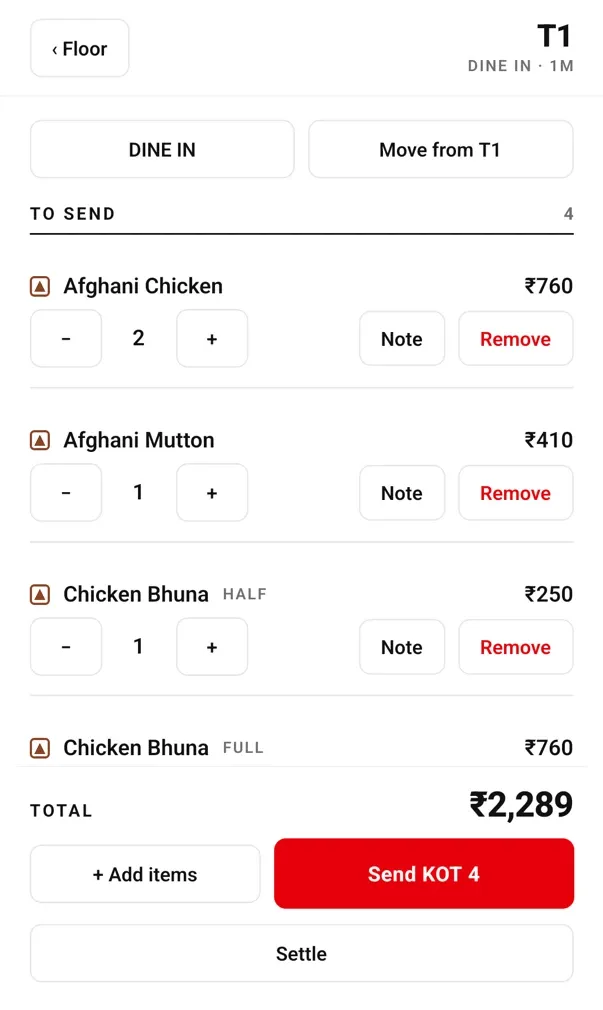
To send, Sent to kitchen ke upar hai. Round one ki fired lines apni jagah rehti hain; kisi fired item ko hatane ke liye Remove use hota hai.
App is rule par strict kyun hai. KOT kitchen ko dish banane ka instruction hai. Ticket par dish aa gayi toh app us ticket ko chupke nahi badalta. Naye items ko naya ticket milta hai.
Teen water aaye, ek wapas gaya.
- Fired quantity kam kar sakte hain. Teen water mein se ek wapas ho toh quantity do kare. Manager ko rush mein aakar is correction ko approve nahi karna padta.
- Fired quantity badhana naya order hai. Fired line par + dabane se next Send KOT ke liye nayi line banti hai. Kitchen wahi banata hai jo KOT par aaya; purani fired line chupke badhane se bill mein aisi plate aa sakti thi jise kitchen ko banane ke liye kaha hi nahi.
- Last unit hatana cancellation hai. Fired line ki last unit hatane ka matlab kitchen ko bheji dish cancel karna hai. Isliye minus one par rukta hai aur phone Remove confirm karwata hai. Record mein aapka naam aur kitchen ko pehle bheje jaane ki baat rehti hai.
Check settle hone tak correct kiya ja sakta hai. Wapas aaye water ke liye waiter ko service ke beech manager ka wait nahi karna padta.
Cooked dish cancel kare: ek confirmation aur poora record.
- Captain khud confirm karta hai. Phone ek baar confirmation maangta hai aur removal captain ke naam se record karta hai, saath mein yeh bhi ki item pehle kitchen ko gaya tha. Desktop App par bhi signed-in staff reason chunta hai; manager PIN nahi maanga jaata.
- Removal record mein rehta hai. Line phone ki active list se hat jaati hai, lekin check history ordered item, remove karne wale staff aur kitchen ko pehle bheje jaane ka record rakhti hai.
- Cancel order poora check band karta hai. Guest chala gaya ya order galti se khul gaya? Check khole aur Cancel order dabaye, phir reason mein se ek tap kare (Customer left, Customer changed their mind, Ordered by mistake, Duplicate order, Wrong table, Item not available) ya apne words mein likhe. Phir dialog mein table (takeaway mein nahi hota), bill aur reason dikhta hai. Sahi bill hai toh Cancel order dabaye, nahi toh Keep order. Manager PIN nahi lagta. Kitchen ne dishes bana di hon toh sheet reasons ke upar bata deti hai. Bill par ek rupee bhi record ho gaya toh phone se cancel nahi hota: balance settle kare ya counter par refund kare. Desktop App ki Orders list aur owner dashboard par bill ke saath reason aur cancel karne wale ka naam dikhta hai. Kuch delete nahi hota; cancelled check din ki history mein rehta hai.
- Discount rupee amount mein hota hai, percentage mein nahi. Captain phone par discount ke liye manager PIN chahiye. Waiter order leta hai; paise ka yeh change manager approve karta hai.
- Captain refund nahi kar sakta, menu edit nahi kar sakta, item Out of stock mark nahi kar sakta aur reports nahi khol sakta. Yeh Desktop App aur owner dashboard ke kaam hain.
Counter ko de ya table par payment mark kare.
- Aam taur par order Running mein chhode. Counter mein har round aa chuka hai. Cashier GST bill print karke check settle karta hai. Phone aur counter se bheje sab rounds ek hi bill mein judte hain.
- Table par sirf Cash ya UPI payment marking. Sheet par likha hai: 'Marking only — no drawer opens and no card is read here.' Aap guest ne kaise pay kiya woh record kar rahe hain; app card payment process nahi karta.
- Phone se drawer, card ya refund nahi. Card machine ya refund chahiye toh counter par handle kare.
- Bill kahan print hoga. Default mein Print bill at the counter bill ko counter printer par bhejta hai. Captain 0.2.12 se Take orders and print them captain ke phone ko apni bill series deta hai aur us captain ki tables ke KOT aur bill unke carried Bluetooth ya Wi-Fi printer par bhejta hai. pehla GST bill print karne ki guide dekhe.
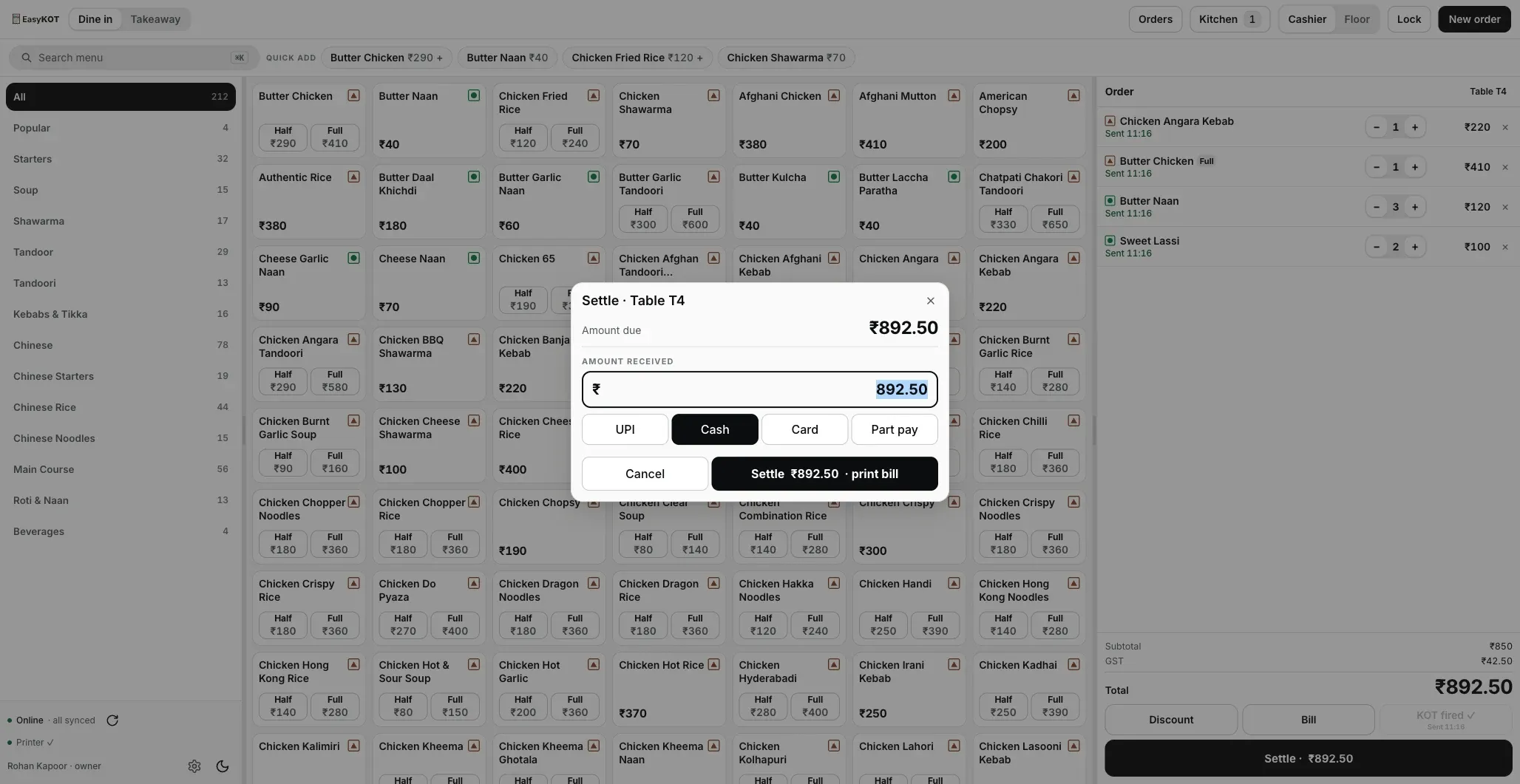
Desktop App ka settle screen. Phone version sirf Cash ya UPI mark karta hai.
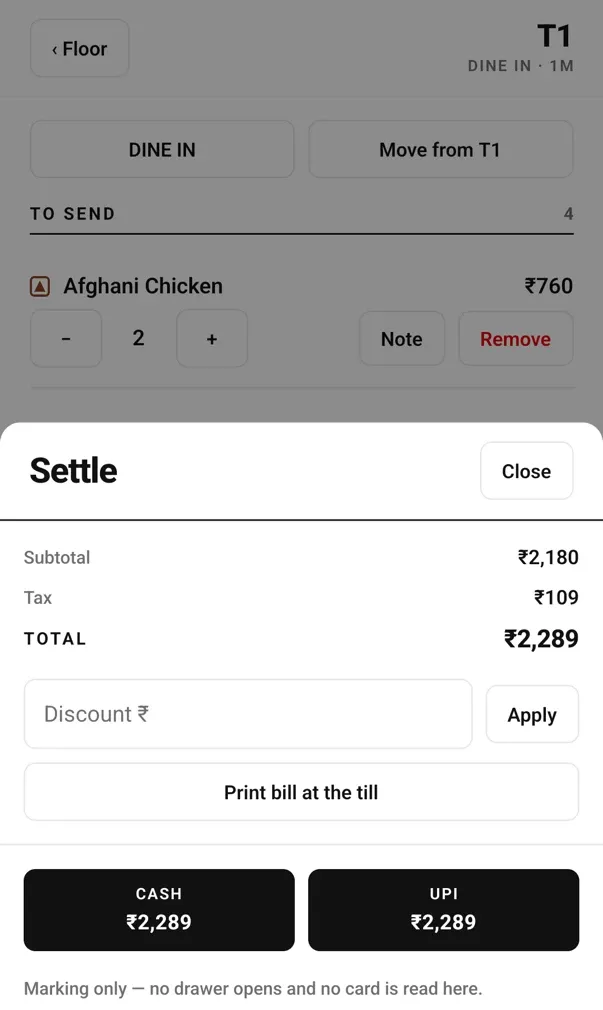
Phone ka settle sheet: footer saaf batata hai ki yahan kya hota hai aur kya nahi.
Veg, non-veg aur kitchen mein khatam dish.
- Green circle veg, brown triangle non-veg. Mark har menu tile par hai, isliye service ke beech staff ko yaad rakhne ki zaroorat nahi.
- Half aur Full alag one-tap buttons hain. Dono prices seedhe tile par dikhte hain; doosra picker ya screen nahi khulta aur bill par selected portion clear rehta hai.
- Khatam dish screen par grey rehti hai, uspar Out of stock label hota hai aur use add nahi kar sakte. Waiter ko pata chalta hai ki dish kitchen mein khatam hai.
- Captain phone se item Out of stock mark nahi hota. Yeh change Desktop App ya owner dashboard par hota hai aur update pahuchne par sab phones par dikhne lagta hai.
Veg aur non-veg marks har tile par dikhte hain.
Seedhe jawaab.
KOT bhejne ke baad naye items add kar sakte hain?
KOT bhejne ke baad quantity kam kar sakte hain?
Guest cooking shuru hone ke baad dish cancel kare toh kya kare?
Waiter poora order cancel kar sakta hai?
Kya kitchen ko special instructions dikhte hain?
Kya do waiters ek table par kaam kar sakte hain?
Waiter bill bhi bana sakta hai?
Order ke beech phone ka Wi-Fi chala jaaye toh order bachta hai?
Yeh page waiters ko bheje.
Is page ko staff group mein bheje. Ismein waiter ke chaar main actions sahi order mein hain, saath mein correction aur kitchen delivery states bhi samjhaye gaye hain.
Order se pehle: phone setup
Owner ka ek baar ka kaam: Staff & pay mein captain add kare, Connect their phone dabaye, one-use QR dikhaye aur unka apna PIN de. Desktop App ka Wi-Fi link optional hai.
Phone setup kare →KOT kahan pahuchta hai
Kitchen screen par timer aur Bump ke saath tickets: paper ki jagah local network par purana monitor ya tablet.
Kitchen display dekhe →Settle karke GST bill print kare
Table khatam ho toh payment apne merchant ya bank app mein verify kare, payment method record kare, CGST aur SGST split wala tax invoice print kare aur check close kare.
Pehla GST bill print kare →Waiters ko phone dena sahi rahega ya nahi? Dekhe captain app page. Portion aur add-on aapke menu se aate hain.
3 mahine try kare, phir plan chune.
Restaurant ka kaam hum samajhte hain, kyunki shuruaat bhi wahin se hui. 3 mahine free try kare, bina card details. Hamari kahani padhe.