Printer pe “Can't verify” likha aa raha hai?
Tension mat lo, yeh koi fault nahi hai. Aapka printer apne status ke sawaalon ka jawaab nahi deta. Bahut saare saste thermal printer aise hi hote hain, aur print ekdum theek karte hain. EasyKOT Desktop App jhooti green dot dikhane ki jagah seedha bol deta hai ki use pata nahi, aur har ticket pehle jaisa hi bhejta rehta hai. Aapko kuch karna tabhi hai jab paper nikalna band ho jaaye.
Printer chale ya na chale, sale save ho chuki hai. Desktop App bill pehle apne andar save karta hai, print uske baad. Har symptom ki poori table mein baaki saare cases hain.
Printer job le leta hai, par apne baare mein ek word nahi bolta.
- Printer status query ka jawaab nahi deta. Desktop App standard ESC/POS status maangta hai, aur sirf sahi format wala reply hi maanta hai. Bahut se budget clone printer ya toh kuch reply nahi karte, ya aisa kuch bhejte hain jo status byte hai hi nahi. Dono ka matlab ek hi hai: unknown.
- Yeh Windows driver queue hai. Jo printer Windows printer ki tarah add kiya hai, woh spooler se print karta hai. Spooler bytes aage bhej deta hai aur wapas kuch nahi batata. Aisi rows hamesha yahi dikhati hain, aur form pe inka label hi “Windows printer (driver queue — no live status)” hai, taaki baad mein surprise na ho.
Pehle yeh karo.
Test print chalao aur paper dekho
Settings → Printers & KDS mein printer ki row pe Test print ka button hai. Width ruler ke saath slip nikal aayi, toh jo zaroori hai sab proven hai: Desktop App printer tak pahunch raha hai aur printer print kar raha hai. Wahi slip aapki green light hai.
Kaam chalu rakho, aur kuch nahi karna
Jobs bilkul waise hi queue hote aur jaate hain jaise jawaab dene wale printer pe. Retry, reroute aur reprint sab same chalte hain. Farak sirf itna hai ki Desktop App paper ka haal jaanne ka daava nahi karega.
Tickets aana band ho jaaye, toh printer ke paas jao
Paper, cover, power, isi order mein. Yeh teen cheezein Desktop App is printer pe dekh nahi sakta. Phir queue check karo: wahan jobs jama ho rahe hain, toh printer Desktop App ko mana kar raha hai ya ignore kar raha hai. Woh alag problem hai, aur uska alag page hai.
Printer ki row kya bolti hai.
Settings → Printers & KDS mein har printer ki apni row hoti hai. Us row pe status green dot se nahi, seedhe words mein likha aata hai. Is problem ke exact words yeh hain.
- Jab tak problem hai: “Can't verify — will still try to print”, warning colour mein nahi, neutral grey mein, kyunki kuch galat hai hi nahi. Is type ke printer ka yahi normal state hai, aur din bhar yahi rehta hai.
- Fix hone ke baad: Yeh badalta nahi, aur badalne ki zaroorat bhi nahi. Yeh tabhi hatega jab printer jawaab dena shuru kare, aur zyada tar printer kabhi nahi karte.
Desktop App ke liye check ke teen result hote hain, do nahi: pakka theek, pakka kharab, aur pata nahi. Jo printer mil toh jaata hai par kuch jawaab nahi deta, use kabhi Connected nahi bola jaata. Jis printer ka paper chup-chaap khatam ho gaya, uspe jhooti green dot se sachcha grey kahin behtar hai.
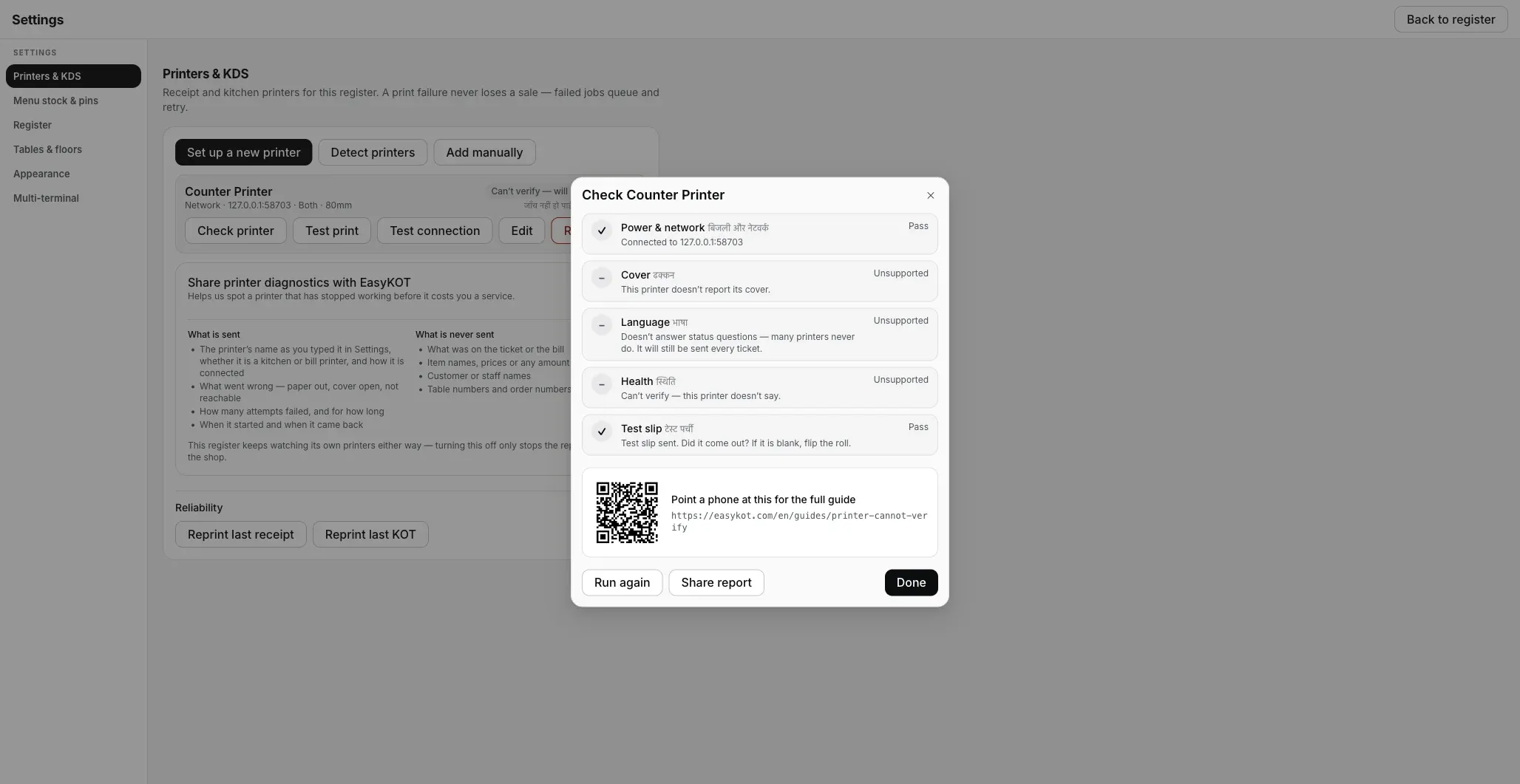
5 mein se 3 checks fail nahi, Unsupported aate hain. Desktop App seedha bolta hai ki use kya pata nahi chal sakta, aur har ticket phir bhi bhejta hai.
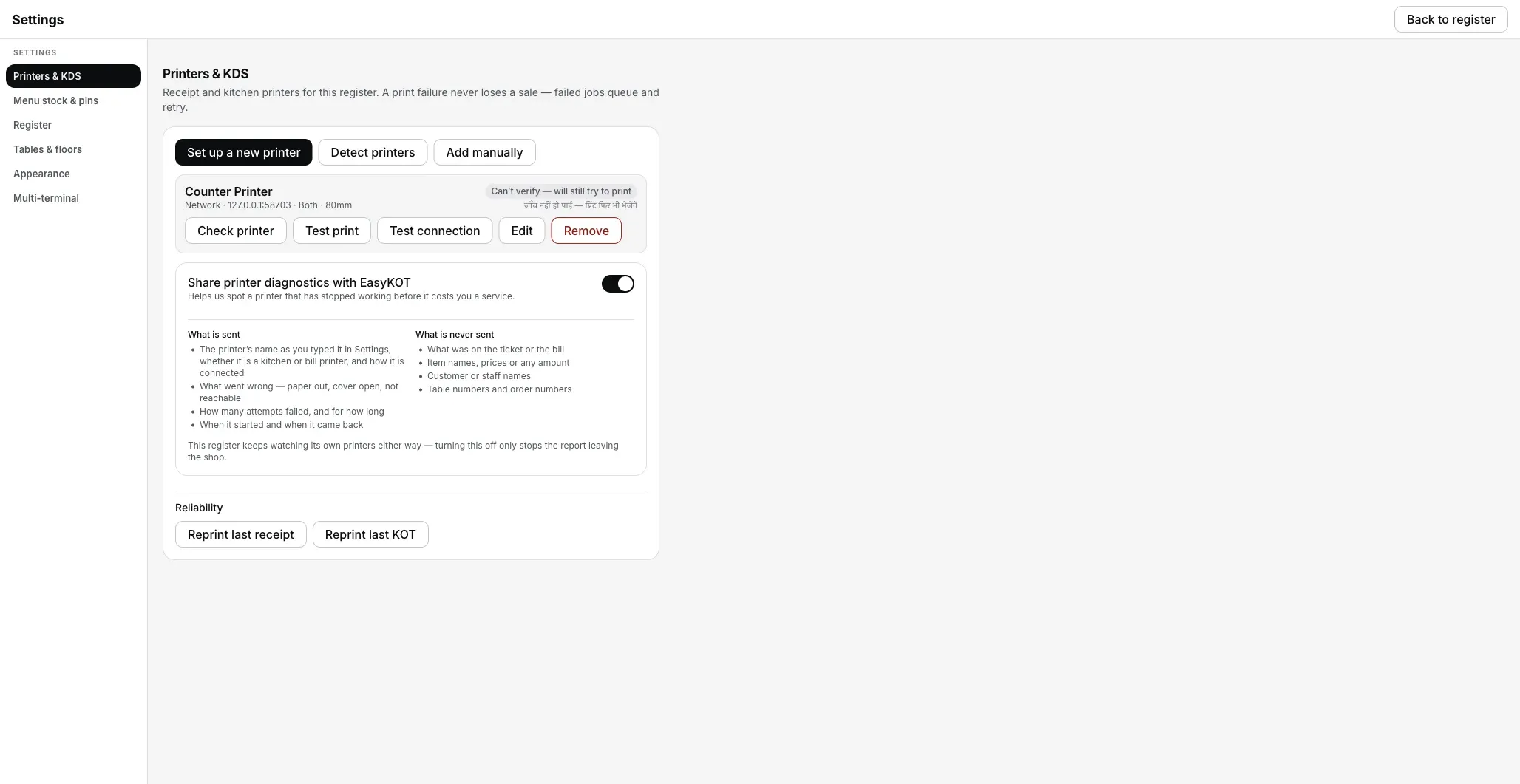
Is type ke printer ka normal state, warning colour mein nahi, neutral grey mein. Din bhar aisa hi rehta hai, yeh error nahi hai.
Jo ticket chhoot gaya, woh kaise nikle.
- Sab kuch waise hi queue aur retry hota hai. Failures, backoff aur reroute bilkul waise chalte hain jaise jawaab dene wale printer pe. Yeh state sirf badalti hai ki screen kya bolti hai. Desktop App kya karta hai, woh nahi badalta.
- Asli check sirf paper hai. Kitchen printer ke liye iska matlab hai pass tak jaake dekhna. Is type ke printer ke saath har POS mein yahi sach hai. Farak itna hai ki yeh Desktop App seedha bol deta hai.
- Reprint normal chalta hai. Reprint last receipt aur Reprint last KOT Settings → Printers & KDS mein hain. Settle hua bill Orders se wapas nikalta hai, DUPLICATE ki stamp ke saath.
Printer pe Can't verify: log aur kya poochte hain
Kya ise Connected dikhane ko bol sakte hain?
Mera printer kharab hai, ya supported nahi hai?
Kaunse printer apna status batate hain?
Yeh nahi tha? Toh yeh dekho.
Printer ek ticket ke baad ruk gaya
Jab paper sach mein aana band ho jaaye: soya hua Wi-Fi, full buffer, ya chup-chaap paper khatam.
Printer ka atakna fix karo →Paper out
Jo printer apna paper sensor report karta hai, woh kya dikhata hai, aur queue uske liye kaise rukta hai.
Reported fault dekho →Thermal printer connect karo
Printer form ka har field, test print, aur paper width ruler.
Printer set up karo →Saare printer guides guides hub pe milenge.
3 mahine try kare, phir plan chune.
Restaurant ka kaam hum samajhte hain, kyunki shuruaat bhi wahin se hui. 3 mahine free try kare, bina card details. Hamari kahani padhe.