Printer prints garbage or boxes
Something is coming out, which means the connection is fine: the printer and the EasyKOT Desktop App just disagree about how to read the bytes. On a serial or Bluetooth printer that is almost always a speed mismatch; on a network printer it is usually the paper width, and occasionally an emulation switch on the printer itself.
Whatever the printer does, the sale is already saved: the Desktop App writes the bill to its own database first and queues the paper second. The full symptom table covers the rest.
Bytes are arriving; they are just being read at the wrong speed or the wrong width.
- A serial or Bluetooth printer at the wrong baud rate. Serial links carry no negotiation: both ends must simply agree. Set the Desktop App to 9600 while the printer runs at 19200 and every character arrives mangled. This is the commonest cause by a distance, and Bluetooth thermal printers are serial ports as far as the operating system is concerned.
- The paper width does not match the roll. An 80mm profile driving a 58mm printer lays 42 characters onto a roll that fits 32, so lines wrap into each other and columns collapse. It reads as gibberish long before you think of the width. The printer form does not guess this for you. It makes you choose 80mm or 58mm before it will save or print, and the test slip is built to catch a wrong choice: it prints a row of digits exactly as wide as the setting, and its own instruction tells you which size to switch to if the row wraps or leaves a wide margin.
- The printer is not in ESC/POS mode. Many printers ship with DIP switches that select an emulation. Flipped out of ESC/POS, the printer receives commands it interprets as text and prints them, which is exactly what a page of symbols looks like.
Do this first.
Print the printer's self-test and read its settings off it
Hold the printer's feed button while switching it on. Most models print their firmware version, their interface and (on a serial model) the baud rate they are actually running at. That slip is the answer key for the next two steps, and because the printer produced it without any help from the Desktop App, it also proves the printer and the paper are fine.
Match the speed, on a serial or Bluetooth printer
In Settings → Printers & KDS open the printer and set Baud rate to the number on the self-test slip, usually 9600, 19200 or 115200. Test print. Baud is ignored for a printer paired over Bluetooth, where the operating system fixes the link speed itself, so if the characters are still wrong on a Bluetooth printer the width is the next thing to try.
Set the paper width to the roll you actually use
On the same form, choose 80mm (42 characters), 58mm (32) or 80mm wide (48, only for an 80mm printer that fits 48 a line): the form will not let you save the printer or print a test page until you pick one. Print the test slip: it prints a row of digits exactly as wide as the size you chose, followed by its own instruction. If the digits wrapped onto a second line, the slip says to choose 58mm; if there is a wide blank margin on the right, it says to choose 80mm. Read the slip and pick the width it names, with one exception: if 80mm wide wrapped, go back to 80mm, not 58mm.
If it is still wrong, check the printer's emulation
Look for a DIP switch block under or behind the printer, and its table in the manual. Set it to ESC/POS. This is the last suspect because it is rarely what changed: a printer that worked yesterday did not flip its own switch, so speed and width are worth ruling out first.
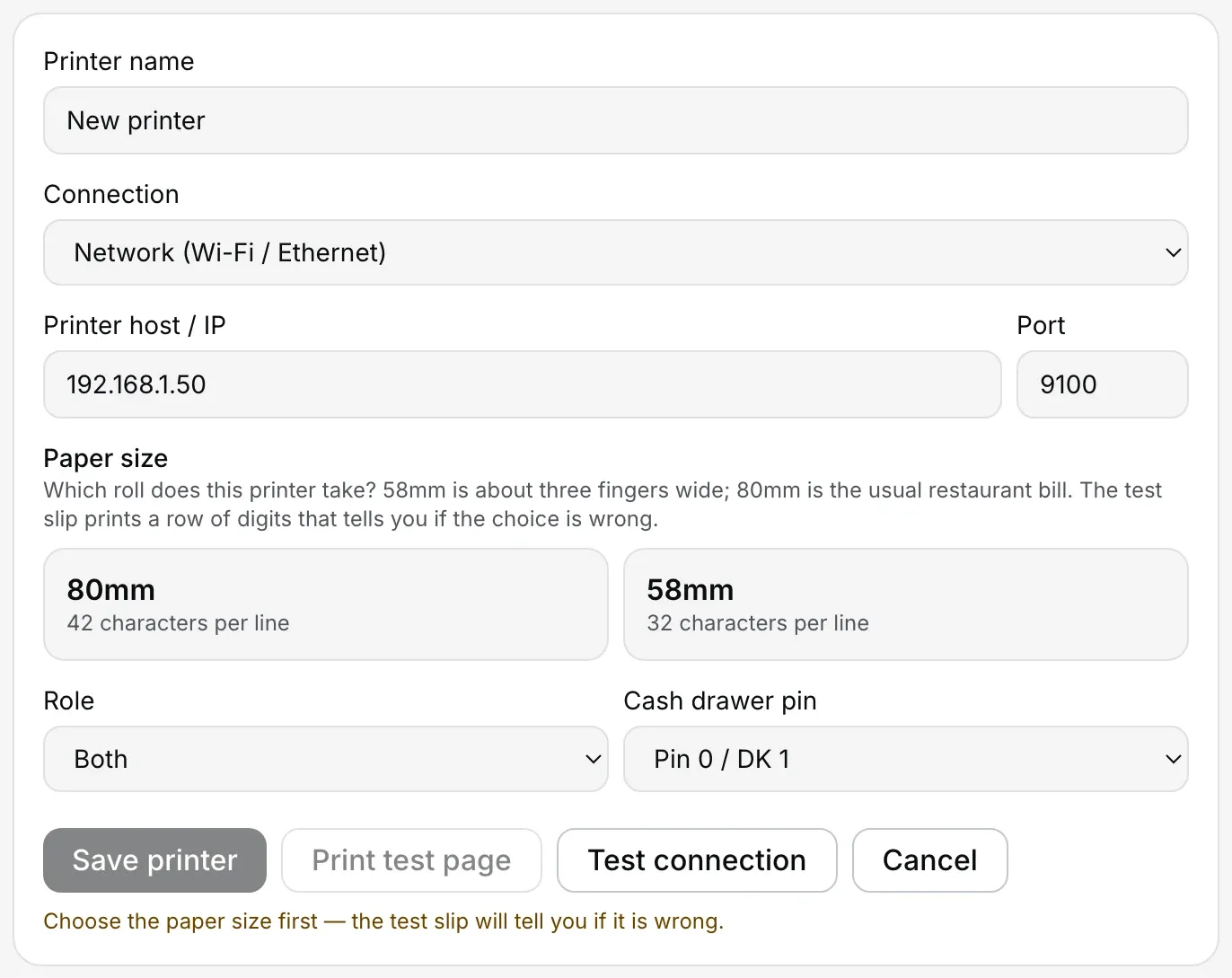
The Paper size field on this form (80mm/42 characters or 58mm/32) is the one to check first on a network printer. Nothing is pre-selected; the form waits for you to pick.
What the printer's row says.
Every printer you have added has a row in Settings → Printers & KDS, and the row carries its own status in words rather than a green dot. These are the exact words for this one.
- While it is wrong: Connected, or on a printer that does not answer status queries, “Can't verify — will still try to print”. Both are honest: the Desktop App handed the bytes over and the printer took them. What happened to them afterwards is not something any status query reports.
- Once it is fixed: Connected, unchanged. A readable slip is the only confirmation this one has.
There is no character-set or code-page setting in EasyKOT to get wrong. The Desktop App sends standard ESC/POS and lets the paper width decide the line length, which is why the width and the baud rate are the two fields worth checking.
Printing what was missed.
- The bill is intact even though the paper is not. Garbled paper has no effect on the sale: the settle was written to the Desktop App's database before a byte reached the printer, and the totals, the invoice number and the GST split are all exactly as rung.
- Reprint once the characters are right. Settings → Printers & KDS has Reprint last receipt and Reprint last KOT. For an older bill, open it in Orders and press Reprint receipt.
- The kitchen copy is worth re-firing by hand. A KOT that printed as symbols reached the pass as waste paper. Reprint last KOT sends it again; the kitchen ticket carries no invoice number, so nothing is stamped or renumbered.
Printer prints garbage — the questions that follow.
The bill prints Rs. instead of ₹ — is that the same problem?
Why does my thermal printer print random letters and symbols?
It prints my text fine but the totals column is a mess.
Do I need a driver to fix this?
If that was not it.
Printer does not cut
Readable slips, joined together: whether your model has a cutter at all, and what to do if it does.
Fix the cutter →Bluetooth printer paired but silent
The COM port Windows never made, and the phone that is still holding the pairing.
Fix Bluetooth →Connect a thermal printer
Every field on the printer form, including baud rate and paper width, with screenshots.
Set the printer up →Every printer guide is listed on the guides hub.
Run it 3 months, then pay for it.
Three months free, full product, no card. Made in India, for the counter: built inside a running restaurant.