Printer doosre network pe hai?
IP bilkul sahi type kiya, phir bhi kuch nahi hua. Kyunki dono address kabhi ek-doosre tak pahunch hi nahi sakte the: 192.168.1.x se 192.168.29.y tak koi raasta nahi jaata. Dono address ke pehle teen number same hone chahiye. Bas itna check karna hai, aur 10 second lagte hain.
Printer chale ya na chale, sale save ho chuki hai. Desktop App bill pehle apne andar save karta hai, print uske baad. Har symptom ki poori table mein baaki saare cases hain.
Do alag private network, beech mein koi raasta nahi.
- Koi ek Guest Wi-Fi pe hai. Guest network ek alag network hota hai, naam wahi bas aage Guest laga hota hai. Uspe jo device hai woh internet tak pahunchta hai, shop ki baaki kisi cheez tak nahi. Sabse zyada yahi hota hai.
- Laptop hotspot pe chala gaya. Laptop ne shop ka Wi-Fi chhoda aur kisi phone ke hotspot se jud gaya, toh ab woh phone ke private network pe hai. Building ka har printer ek saath gayab ho jaata hai, aur yahi iska sabse accha sign hai.
- Do router hain. Pehle router mein laga doosra router apni alag range deta hai. Uske peeche sab kuch 192.168.29.x pe hai, EasyKOT Desktop App 192.168.1.x pe, aur dono taraf se koi baat shuru nahi kar sakta.
Pehle yeh karo.
Printer ka address uski apni status slip se padho
Printer ka feed button dabake rakho aur switch on karo. Jo slip niklegi uspe printer ka abhi wala IP address hota hai. Yeh printer khud bata raha hai, Desktop App ka andaaza nahi.
Desktop App ka address padho
Windows pe Settings → Network & internet → Wi-Fi → Hardware properties. Mac pe System Settings → Network → Wi-Fi → Details. IPv4 address chahiye, jo 192.168.1.14 jaisa dikhta hai.
Pehle teen number milao
192.168.1.14 aur 192.168.1.50 same network pe hain, baat ho jaayegi. 192.168.1.14 aur 192.168.29.50 nahi hain, aur kitna bhi dobara type karo, kuch nahi badlega. Yeh hisaab ki baat hai, timing ki nahi. Isliye Desktop App timeout ka wait kiye bina pakka bol sakta hai.
Dono ko shop ke main Wi-Fi pe lao
Desktop App ko Guest ki jagah main network pe dobara join karo, ya printer ko wahan le aao. Do router hain toh dono devices ek hi router pe hone chahiye. Ya printer ko cable se usi router mein laga do jis pe Desktop App hai, phir yeh jhanjhat hamesha ke liye khatam.
Printer ki row kya bolti hai.
Settings → Printers & KDS mein har printer ki apni row hoti hai. Us row pe status green dot se nahi, seedhe words mein likha aata hai. Is problem ke exact words yeh hain.
- Jab tak problem hai: Jab tak Desktop App knock kar raha hai, “Offline”. Network check chalne ke baad “Your router is keeping devices apart”. Abhi Desktop App network ki dono problems (printer doosre network pe, aur router apne hi devices ko alag rakh raha hai) ek hi status mein dikhata hai. Isliye yeh page aur router isolation wala page saath mein padho. Step 3 ka address compare hi dono ko alag karta hai.
- Fix hone ke baad: “Connected”, aur queue ke jo tickets abhi bhi apne 5 minute wale window mein hain, woh line se print ho jaate hain, kuch dabana nahi padta; jo tickets 5 minute se zyada wait kar chuke hain, unpe Print dabao.
Captain ke phone pe yeh poora likh ke aata hai: app phone ka address aur printer ka address dono batata hai, aur waiter ko bolta hai printer wale Wi-Fi pe jao, yaani main network, Guest nahi.
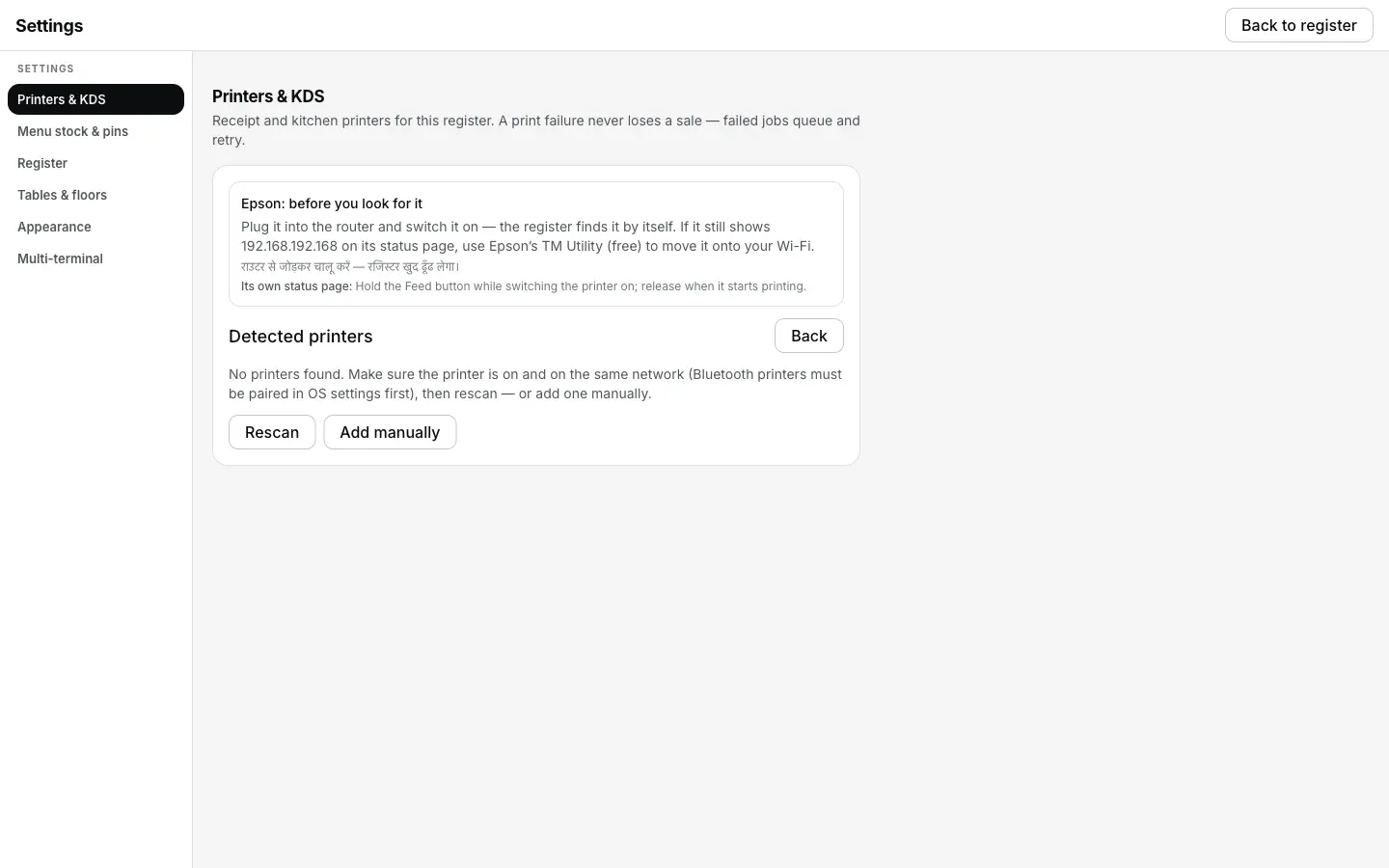
Detect printers ko kuch na mile, yahi pehla sign hai: Desktop App aur printer do aise network pe hain jo kabhi mil hi nahi sakte the.
Jo ticket chhoot gaya, woh kaise nikle.
- Kuch print nahi hua, par kuch lost bhi nahi hua. Address match nahi kar rahe the tab jo bhi ticket fire hua, sab Settings → Printers & KDS ke print queue mein hai, aur apne schedule pe khud retry kar raha hai.
- Network match hote hi queue apne aap chalu ho jaata hai. Jo tickets abhi bhi apne 5 minute wale window mein hain, woh bina kuch dabaye print ho jaate hain. Jo 5 minute se zyada wait kar chuke hain, unke liye Print dabana padta hai.
- Lamba backlog chhota kar sakte ho. Agar aadhe tickets ki ab zaroorat nahi (ek ghante ke kitchen tickets, jinka khana ban bhi chuka), toh un rows pe Discard dabao. Jo chahiye unpe Print dabao.
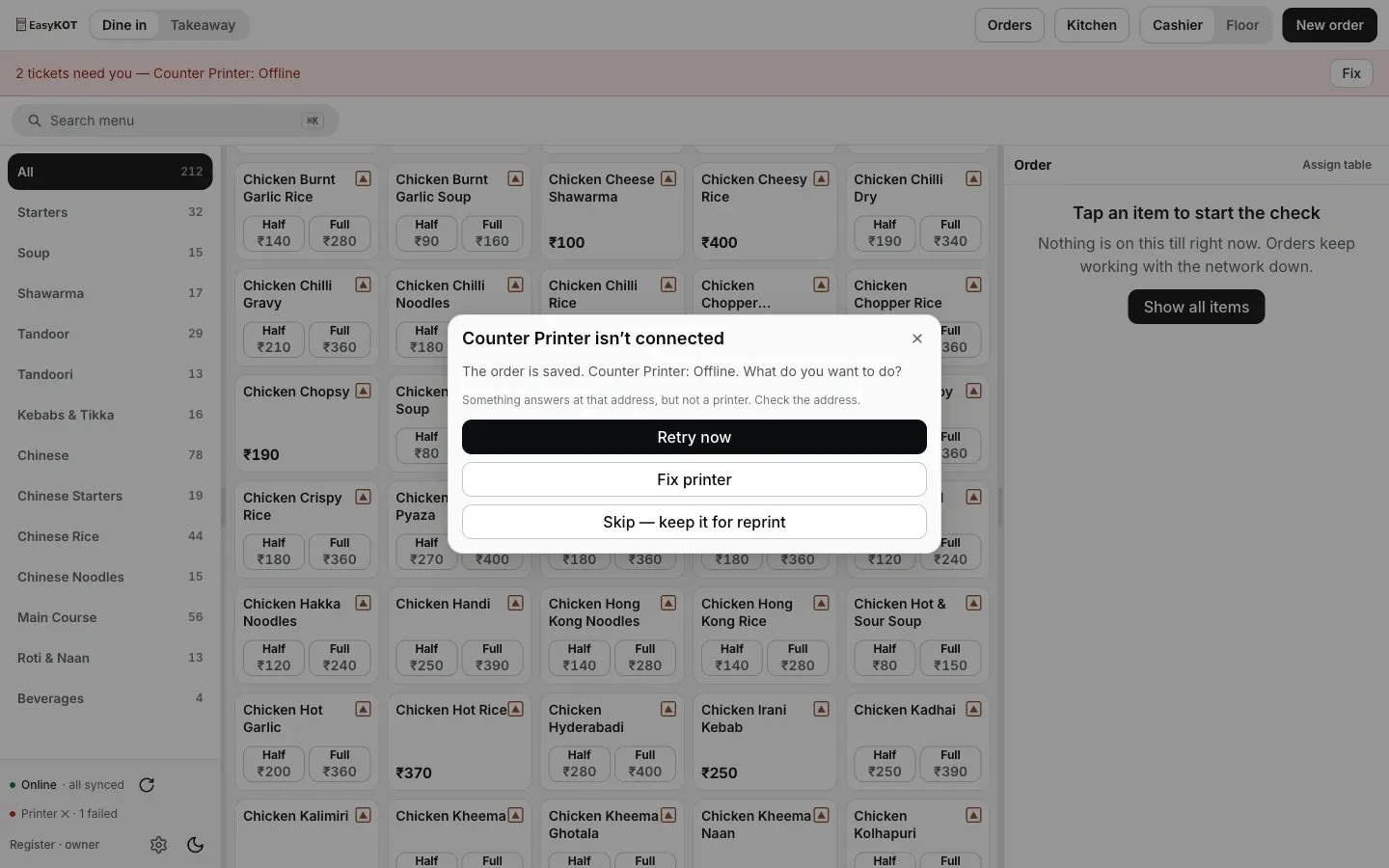
Printer kisi bhi wajah se na mile, Desktop App yahi recovery options deta hai. Dialog pe Offline likha hai, lekin asli wajah address ka mismatch hai, printer kharab nahi.
Printer doosre network pe: log aur kya poochte hain
Waiter ka phone mobile data pe hai. Kya yahi problem hai?
Dono mere Wi-Fi pe hain, phir bhi printer tak kyun nahi pahunch raha?
Kya doosri shop se internet ke through printer use kar sakte hain?
Desktop App sahi network pe hai, par waiter ke phones nahi.
Yeh nahi tha? Toh yeh dekho.
IP se bhi nahi mil raha
Same network, phir bhi connection nahi: router apne hi devices ko alag rakh raha hai.
Router check karo →Printer Offline dikha raha hai
Raat mein address badal gaya, aur Desktop App khud uske liye kya karta hai.
Address dhoondho →Captain app setup
Waiters ke phones ko baaki sab ke network pe laana, codes aur PIN ke saath.
Phone set up karo →Saare printer guides guides hub pe milenge.
3 mahine try kare, phir plan chune.
Restaurant ka kaam hum samajhte hain, kyunki shuruaat bhi wahin se hui. 3 mahine free try kare, bina card details. Hamari kahani padhe.